Putikeeg CW Trainer UT2UBM mod
Learn Morse code on a trainer that keeps up with your hand.
The Putikeeg CW Trainer is a small, battery-powered Morse code trainer. The hardware is good, but the stock firmware holds it back: it has only a few functions, and it does not handle an iambic paddle well.
The UT2UBM mod is new firmware for the same device, written from scratch. It turns the trainer into a complete CW course that fits in your pocket. It takes you from your first two letters to copying and sending whole words. No computer, no phone app, no subscription. Switch it on and practice.
Who it is for
- Newcomers who want to learn CW the right way, by sound, from the first day.
- Active operators who want to raise their speed or clean up their sending.
- Owners of a Putikeeg trainer who want more from the device that they already have.
Features
Three ways to practice
- Receiving. The trainer plays a character or a word, and you copy it. A smart four-button keyboard lets you pick any character in three presses at most. Missed it? Hold a button to hear the item again, as often as you like.
- Sending. The trainer shows a character or a word, and you key it. It decodes every character as you send it. If you make a mistake, you see it at once, together with the character that the trainer heard.
- Free Input. Just key. You hear a clean sidetone, and the screen shows the decoded text. It is the perfect warm-up before a contest or a QSO.
The Koch method, extended with words
Both training modes teach 43 characters in Koch order, from K and M up to the prosigns BT, SK and AR. Every character plays at full speed, so you learn its sound, not a count of dots and dashes. Each level adds one new character.
The classic Koch method drills single characters. But on the air, characters come in a steady stream, and many learners find the jump from single characters to whole words hard. This trainer makes that step smooth. After every two character levels comes a word level. You learn new characters and, at the same time, train your ear and your hand to work with sequences. When you meet real words, they already feel familiar.
The words are random groups of the characters that you already know. They start short and grow with you: two
characters in the first word levels, then one character longer after every two word levels, up to the
Max Word Length setting (4 to 8). When you know all the characters, only word levels remain. Each of them adds one
more word to the session, from 10 up to 100.
A level is a session of 50 characters or 10 words and more. To pass, answer 90 % of the characters or 80 % of the words right on the first attempt. You get three attempts for each item. You can go back to any level that you passed to brush up.
Progress that sticks
The trainer remembers your level for each mode and for each speed. Your progress stays after power-off and after a
firmware update. The main menu shows your current level next to Receiving and Sending, so you always know where
you are.
A keyer that does iambic right
Choose Straight, Iambic A or Iambic B. Squeeze the paddle and get dits, dahs and spaces with exact timing.
Left-handed, or a paddle that is wired the other way? One setting swaps the levers. A straight key works too.
Your speed, your spacing
Set the character speed from 5 to 50 WPM, separately for receiving and for sending. Farnsworth spacing adds longer pauses between characters and words. You hear each character at full speed, but you get more time to think.
A tone you can listen to for hours
Pick a pitch from 400 to 1000 Hz in steps of 10 Hz, and hear a preview while you change it. Soft edges on every element remove key clicks. Plug in headphones and the speaker goes quiet, for practice late at night.
Speaks ham
The decoder knows letters, digits, 17 punctuation marks and the prosigns AR, BT, KN, AS and SK. You choose how the
prosigns show: as a punctuation mark (+), as a prosign (<AR>) or both (<AR/+>).
Easy on the eyes
Set the backlight in ten steps or switch it off, and tune the contrast to your screen. If you ever set them so badly that you cannot read the screen, a special start brings the default values back.
Free and open
The firmware is open source under the BSD 3-Clause License. The reverse-engineered schematic of the trainer is open too, under the CERN Open Hardware Licence. Read the code, change it, share it.
At a glance
| Modes | Receiving, Sending, Free Input |
| Characters | 43 in Koch order: letters, digits, punctuation, prosigns |
| Speed | 5 to 50 WPM, with Farnsworth spacing |
| Key types | Straight, Iambic A, Iambic B, with paddle reversal |
| Sidetone | 400 to 1000 Hz, click-free, speaker or headphones |
| Progress | Saved for each mode and each speed |
| Board | CW_MINI_V2.0D |
| Firmware version | 0.1.0 |
| License | BSD-3-Clause (firmware), CERN-OHL-P-2.0 (hardware) |
Get started
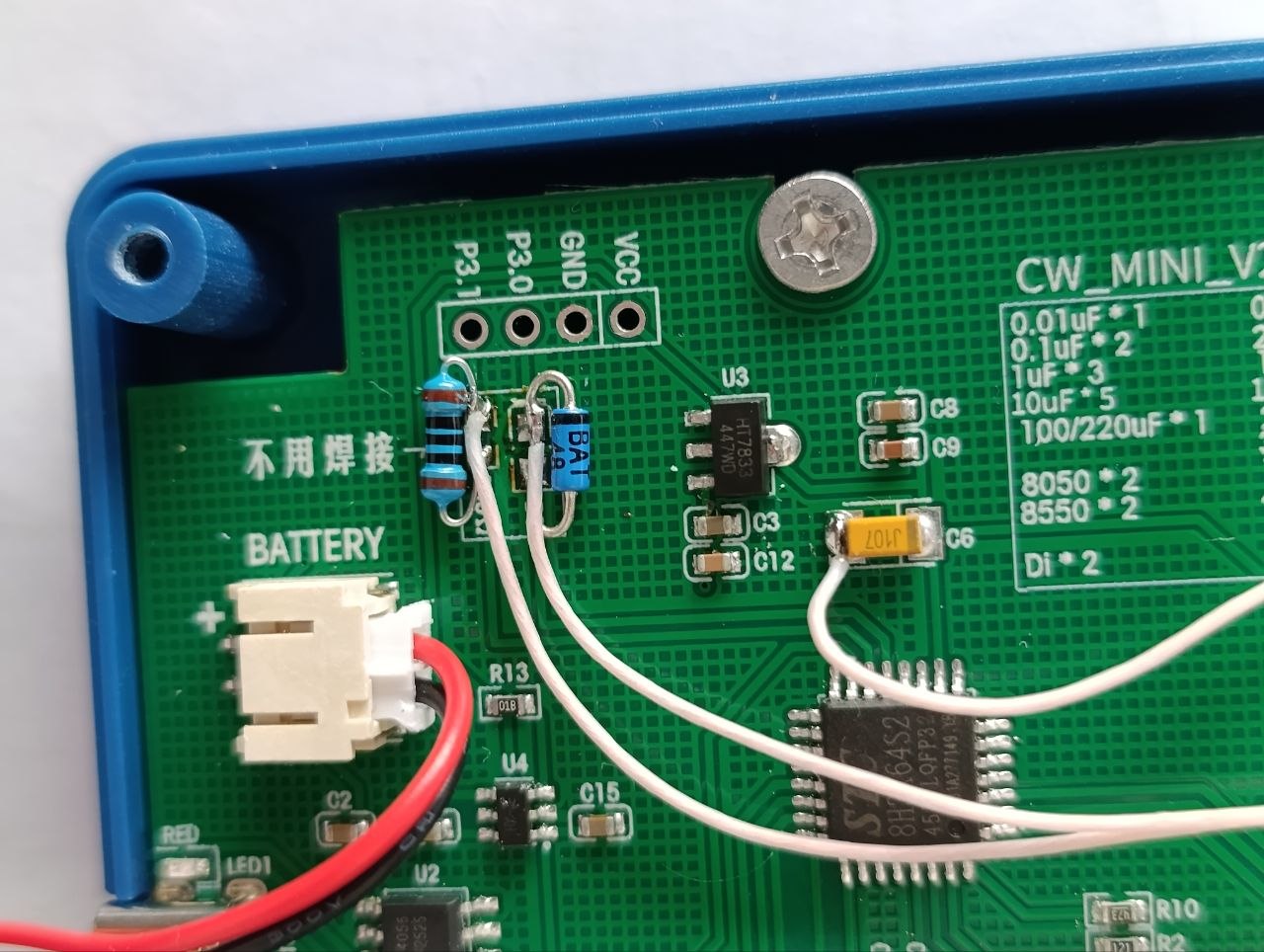
To install the firmware, you need a USB-to-serial adapter, a Schottky diode and a 100 Ω resistor. You connect three wires to the programming header next to the battery connector and run one script. The download keeps your settings and your training levels, so later updates are just as easy.
Read the guides in this order:
The release notes list what is new in each version.
Open-source resources
- Source code and schematic: GitHub: Quard/putikeeg_cw_trainer__ut2ubm
- Questions and ideas: open an issue on GitHub, or write to ut2ubm.support@gmail.com
The UT2UBM mod is an independent firmware project. The rights to the original Putikeeg CW Trainer design stay with its manufacturer.